Attendee Details
We're excited to welcome you to the Historic Union Station in Indianapolis. See below for all the details you need to get the most out of your conference experience.
Get the App for a Successful FTR Conference Experience!
To ensure you get the most out of your time with us, please take the time to review the steps below!
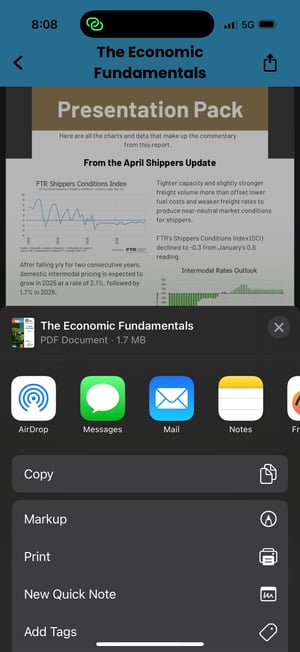
The app is your ticket to content. All presentation slides will be loaded to the app for downloading.


You can also login via your web browser: FTR Conference App
You'll need to use the email address you used to submit your registration to access the app.
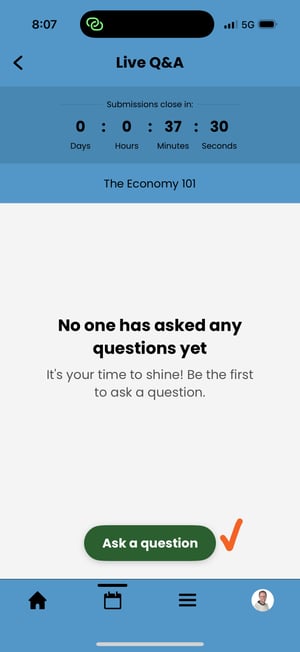
On the day of the event, you will need the app to download slides, read speaker bios, and submit Q&A.
The app is accessible on your computer, phone, or tablet. Sessions will look something like this, depending on if you are using the mobile or desktop version: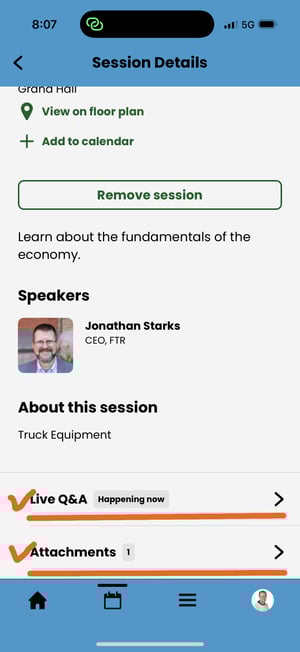
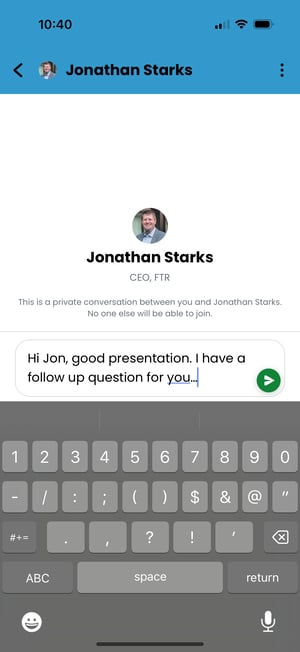
Within the app, you can connect directly with other conference attendees, schedule on-site meetings, and take notes on all of your conversations.
Attendee Details
Event Essentials
-
Located just outside of the Grand Hall Ballroom entrance, the Registration Team will get you checked in and provide you with your name tag. Your name tag is required for all conference activities so please pick it up before you attend any sessions!
-
Meeting Attire: Business casual attire is recommended—wear what makes you feel comfortable, and consider bringing a sweater or coat in case the conference rooms are cool.
Reception Attire: It’s time to relax and have a good time. If you would like to change out of your business casual, that is acceptable.
-
Breakfast will be held in the Union Station Exhibit Hall, and lunch will be served in the Illinois Street Ballroom.
-
You can make your hotel reservation at the Crowne Plaza at the Union Station -- The official conference hotel.
Click here to book your room
Located just outside of the Grand Hall Ballroom entrance, the Registration Team will get you checked in and provide you with your name tag. Your name tag is required for all conference activities so please pick it up before you attend any sessions!
Meeting Attire: Business casual attire is recommended—wear what makes you feel comfortable, and consider bringing a sweater or coat in case the conference rooms are cool.
Reception Attire: It’s time to relax and have a good time. If you would like to change out of your business casual, that is acceptable.
Breakfast will be held in the Union Station Exhibit Hall, and lunch will be served in the Illinois Street Ballroom.
You can make your hotel reservation at the Crowne Plaza at the Union Station -- The official conference hotel.
Click here to book your room
Program Info
-
You will find all of this on the Conference App.
- agenda & create your personal schedule
- attendee information & connect with others
- session details - speaker bios & presentations
- Q&A participation during sessions
You'll need to use the email address you used to submit your registration to access the app.
-
This is a private meeting.
Press is allowed, however, the information to be provided is for your internal company use. You may discuss the general content of the meeting with clients but you may not quote any of the presenters unless you have prior approval from both FTR and the presenter.
-
If you’re unable to attend, you may send a substitute from your company in your place for the same day/track(s) as your original registration.
Please email substitution requests to events@ftrintel.com.Read the Registration Terms and Conditions for the FTR Transportation Conference.
-
No Replay Available
We have switched back to in-person and live sessions only. If you miss a session you can still download the presentation slides.
You will find all of this on the Conference App.
- agenda & create your personal schedule
- attendee information & connect with others
- session details - speaker bios & presentations
- Q&A participation during sessions
You'll need to use the email address you used to submit your registration to access the app.
This is a private meeting.
Press is allowed, however, the information to be provided is for your internal company use. You may discuss the general content of the meeting with clients but you may not quote any of the presenters unless you have prior approval from both FTR and the presenter.
If you’re unable to attend, you may send a substitute from your company in your place for the same day/track(s) as your original registration.
Please email substitution requests to events@ftrintel.com.
Read the Registration Terms and Conditions for the FTR Transportation Conference.
No Replay Available
We have switched back to in-person and live sessions only. If you miss a session you can still download the presentation slides.